The basic operations provided by the system
- Creation of the questionnaire template.
- Input and careful check-up of all elements of the questionnaire.
- Setting the navigation through the questionnaire.
- Setting the rules for checking the reliability of the input information.
- Input and editing of the questionnaire array on desktop and portable PCs and remote workplaces.
- Review and check-up of the information.
- Export of the questionnaire array to external formats for further statistical processing.
Implementation of DigSee SURE resolves the following problems.
Possibility to create questionnaires and forms “on the fly”
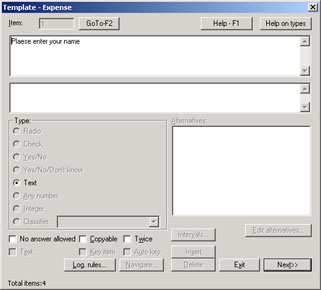
Now the problems of developing a new questionnaire and its formalisation for further input are reduced to a one-stage task. The process of questionnaire formalisation passes naturally, simply and visually. It is not necessary anymore to keep numerous paper versions of your questionnaire.
SURE allows you to keep several descriptions of different forms and questionnaires, and to speedily create a new questionnaire based on your previous elaborations, just by copying and editing an available template. It is very simple to set parameters of questions, such as mandatory or optional, request for repeated entry, a “user hint” option by way of the previous questionnaire entry. It is possible to set intervals.
All popular types of questions are supported, such as:
- input of numbers;
- integers;
- yes/no;
- yes/no/I don’t know;
- alternative option (one option from the list);
- sample (it is possible to select many options from the list);
- a choice from the classifier (for example, postal code).
In a questionnaire, it is possible to set questions that require a unique answer — the so-called key. Setting an automatic key is also possible. For each question it is possible to enter the user’s text — comments.
For the whole questionnaire, you can set navigation — automatic transition from question to question through the questionnaire depending on the answer of the respondent. There is also a possibility to set logical rules for the questionnaire, which would allow you to provide an additional check-up of the data during their input.
SURE improves the efficiency of staff at questionnaire input with simultaneous quality improvement
This is achieved due to:
- optimisation of the input process for both keyboard-only and keyboard + mouse options;
- syntactical control of questionnaires on input (request of an answer, possibility of no response, check of allowed intervals);
- “smart” control of questionnaires during their input due to the usage of special logical rules (questionnaires which have been entered by the operator without errors, but contain logic errors: for example, the respondent gives contradictory answers on two semantically identical characteristics);
- significant reduction of the amount of input information due to automatic navigation through the questionnaire (transitions to other questions depending on the answer of the respondent);
- usage of special characteristics for particular types of questions, which allows one to avoid mistakes. It is possible to set a request for repeated input of critical information, for example the number of one’s social insurance card. It is possible to set that by default the operator be offered the corresponding data from a previous questionnaire. For example, the field “operator name” will be proposed by default for all questionnaires after the first one is completed, which would allow you to minimise time and reduce the number of mistakes.
Business expansion with simultaneous cost reduction
Due to the time savings in the development of questionnaires and their software formalisation, and, what is most important, due to the speedy acquisition of adequate and correct information, you can expand your business without any additional costs.
Better competitiveness of your business and services
Usage of the DigSee SURE solution allows you to define the bottlenecks in your company’s business processes “on the fly” due to the acquisition of the results of interviews and questionnaires obtained from your employees and clients.
Quality improvement of estimations and predictions
If the primary data are wrong, it is very difficult to improve the quality of estimations. Sometimes it is practically impossible. Usage of the DigSee SURE system will allow you to control the information at the very moment of its input. Moreover, usage of navigation and syntactical control makes it possible to reduce the number of operator errors practically to zero.
The available powerful tool of logical control of the answers allows you to analyse the questionnaire “validity” and “integrity”. There is a possibility to “catch” questionnaires which are entered without operator errors, but still contain logic errors. For example, the respondent contradicts himself or herself on two semantically identical characteristics. Here the operator has a possibility to save such a logically incorrect questionnaire for its further analysis by managers and analysts.
Safety of information critical for your company. Separation of different business processes
DigSee SURE has a built-in security system. The base of the data storage in the SURE system is an SQL database, which provides integrated data storage and guarantees that your information remains confidential. The users of your system will have different access rights. The rights are set by the system administrator.
For each user it is possible to set his or her login and password, and to set or cancel the following rights:
- to view already entered questionnaires;
- to enter new questionnaires;
- to edit questionnaires;
- to create and edit questionnaire templates.
Find a breakthrough for a sharp increase of profits by zero-risk investment in the latest technologies
The amazingly cost-effective DigSee SURE solution is distributed completely ready to use, out of the box.
In less than one hour, the solution is installed on your computers. Moreover, as our solutions are verified by time, we are ready to install a completely serviceable solution for you for a test period without any payment required for the test period.
The Desktop/Notebook solutions require no additional office equipment. The solution can be installed on any desktop computer with any of the most popular operating systems from Microsoft: Windows 98/NT/2000/ME/XP.
DigSee SURE gives you a unique possibility to improve the profitability of your enterprise without bearing any financial risks.
Support of your business extension and distributed structure
Depending on the particular business requirements, the system can easily be extended.
It is possible to start from one workplace.
Using the import/export capabilities, it is possible to organise the joint work of remote workplaces and departments. In this case, exchange of templates and questionnaires can be provided by floppy disks, CDs, e-mail and other methods.
In case the number of users at your office increases, it is possible to organise collective operation: to process questionnaires in a local network or Intranet network of the company with a dedicated server, where all the required information will be stored (see Network SURE).
But the most productive and effective extension of the system is, in our view, its support of true mobility! DigSee has completed the development of mobile SURE, which is easily integrated with the office solution.
This version of the software runs on compact and cost-effective handhelds, which are much cheaper than desktop computers, can be carried in a shirt pocket and allow your field staff to fill in questionnaires and forms in situ. Moreover, your remote representatives get the possibility to receive updated forms, as well as to transmit their filled questionnaires to the office remotely: through a modem, using a GSM/GPRS connection, or even via the Internet. See Mobile SURE.
Distinctive features of DigSee SURE
High speed of data preparation, input and processing
- fast and handy preparation of templates;
- speedy and ergonomic information input, both from the keyboard and with the help of the keyboard and mouse;
- fast and simple conversion into external formats.
Flexibility
- possibility of template creation for any type of questionnaire;
- the information scope is limited only by the computing system resources.
Simplicity and convenience in operation
- operation in the Microsoft Windows environment;
- navigation means for fast access to any questionnaire within one questionnaire array or to any characteristic within one questionnaire;
- subdivision of questionnaires into different arrays depending on the level of questionnaire correctness.
Intelligent processing
- support of the logical rules of questionnaire analysis by characteristics and their interaction;
- support of automatic navigation through each questionnaire;
- possibility of separate editing and review of logically correct and logically incorrect questionnaires.
Scalability and safety
- possibility of using the system within the structure of the enterprise — organisation of remote workplaces and departments due to the import/export capabilities;
- support of the system administration, set-up of the users’ list, logins, passwords and access rights;
- possibility of the system extension by network workplaces, which operate with the uniform database in a local network of the enterprise or in an Intranet network;
- system extension by remote support of the field staff: application of the Palm SURE system for cost-effective handhelds.
- SURE makes possible the creation of templates and data input for any forms and questionnaires. The information scope (number of questionnaires) is limited only by the available resources of one’s PC.
- SURE provides convenient tools for data editing and takes advantage of powerful navigation through the questionnaire arrays.
- SURE is equipped with means of syntactical and logical control of questionnaires.
- SURE allows simultaneous questionnaire input by several operators.
- SURE provides a possibility of questionnaire export into SPSS, Microsoft Access and Microsoft Excel.
- SURE operates in the unified Microsoft Windows environment.
SURE functions related to operation with templates
To work with a questionnaire, it is necessary, first of all, to describe its structure, i.e. to create a template of the given questionnaire. For operation with questionnaire templates, the software has a special mode, which is described in more detail in the chapter “User’s guide”.
The main functions related to operation with templates are creation, editing, export and import.
For creation or editing of a template, the respective questionnaire characteristic (question type) is set, as well as a block of parameters of the given characteristic, depending on the type of the answer to the given question.
The following types of characteristics are supported:
- Radio
- Check
- Yes/No
- Yes/No/I don’t know
- Any number
- Integer number
- Text
- Classifier
Depending on the type of the characteristic, such parameters as “Other options”, “Comments”, “Navigating” and “Key field” can be set.
For all characteristics, the “No Response” parameter can be selected.
SURE functions related to operation with questionnaires
The main functions related to operation with questionnaires are:
- Input and editing of questionnaires.
- Viewing information of questionnaires and their characteristics without a possibility of editing.
- Information retrieval; for example, a possibility to find a questionnaire by the household number.
- Convenient navigation through questionnaires and characteristics. Transition (“skip”) patterns for particular questionnaires and characteristics are provided.
- Support of automatic navigation through a questionnaire depending on the answer of the respondent. For example, if the person answered some questions positively, he or she should proceed to another block of questions, and thus part of the questions should be skipped by the interviewer. The program in this case immediately passes to the appropriate block. In the fields of the skipped questions, “No Response” is written down automatically.
- Control of data input: the software would not allow one to enter a wrong answer code for any particular characteristic.
- Logical control of the information. For example, the person contradicts himself or herself on two semantically identical characteristics. In this case, before the input of the questionnaire or characteristics is finished, a warning will be given that a logic error is detected. Thus, the operator gets a possibility to verify the questionnaire, to return to its editing or to place this questionnaire into the array of logically ill-conditioned questionnaires for subsequent analysis.
- Possibility of data export into the SPSS software package, Microsoft Excel and Microsoft Access.
- Possibility to keep the following information arrays separately: (1) questionnaires which are logically correct and contain no operator errors; (2) questionnaires that have been entered with no errors by operators, but contain logic errors (for example, the respondent contradicts himself or herself on two semantically identical characteristics). These questionnaires are intended for subsequent analysis and possible amending by economists and analysts.
- Automatic transfer of a questionnaire with corrected errors into the category of correct questionnaires after the editing and correction process is completed.
More detail on the system operation with questionnaires is given in the chapter “User’s guide”.
Functions related to the system administration
- Set-up of the users’ list.
- Set-up of a user’s login name and password.
- Management of the rights of the system users.
- Set-up of the system’s mobile users (see Mobile SURE).
- Set-up of network workplaces (see Network SURE).